The Great ReAct Debate: Internal Loops vs. Routing Choreography
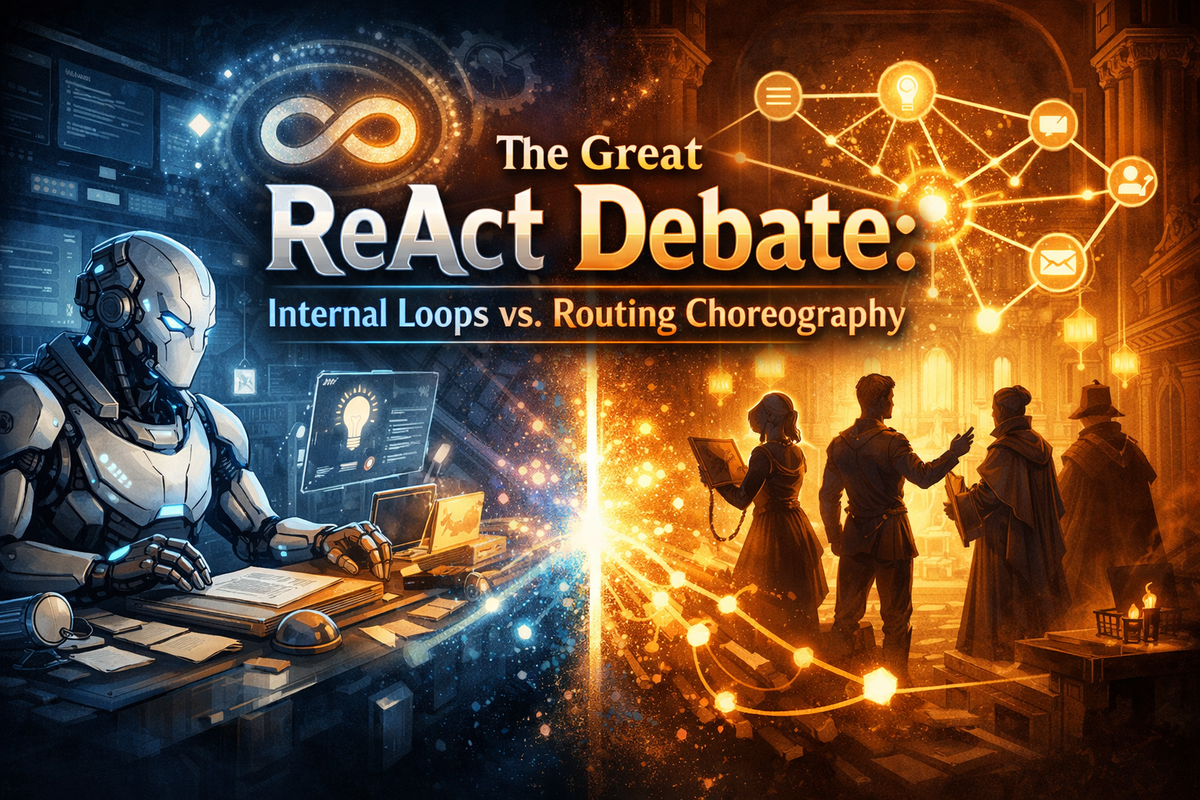
“Two paths to the same destination, but should your AI reason in tight circles or dance across the guild?”
If you've ever watched a chef working a line versus a team orchestrating a tasting menu, you've witnessed the same architectural tension we're about to explore. One person, iterating rapidly with all tools at hand. Or a coordinated ballet of specialists, each message passing through carefully designed stations. Both produce remarkable results. Both have their moment to shine.
In Rustic AI, this tension manifests in two distinct patterns for implementing ReAct (Reasoning + Acting) workflows:
- Internal ReAct Loop - The
ReActAgentclass handles think-act-observe cycles internally - Routing-Based ReAct Loop - The guild's routing system orchestrates the reasoning loop across agents
Let's pull back the curtain on both patterns, understand their inner workings, and discover when each one becomes your secret weapon.
Act I: The Classic Internal Loop
The ReActAgent's Solo Performance
Picture a seasoned detective working a case. They have a wall of evidence, a toolkit of investigative techniques, and a sharp mind that cycles through hypotheses. Examine the clue. Call the lab. Process the results. Form a new theory. Repeat. That's the ReActAgent in a nutshell.
agent_spec = (
    AgentBuilder(ReActAgent)
    .set_properties(ReActAgentConfig(
        model="gpt-4",
        max_iterations=15,
        toolset=SkillToolset.from_path(Path("skillspdf")),
        system_prompt="You analyze documents systematically."
    ))
    .build_spec()
)
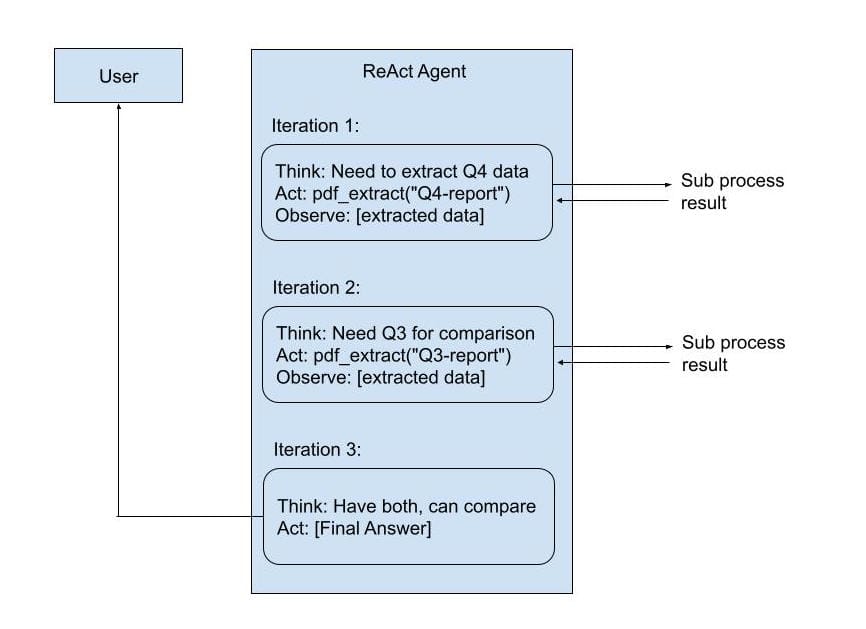
When you send a request to a ReActAgent:
- Think: LLM receives the user query and decides what to do
- Act: If a tool is needed, ReActAgent calls it directly (subprocess execution)
- Observe: Tool result is appended to the conversation context
- Repeat: Steps 1 through 3 continue until the LLM says "I'm done" or the maximum number of iterations is reached
User: "Extract metrics from Q4-report.pdf and compare to Q3"
The Technical Magic:
The ReActAgent maintains an internal conversation buffer. Each tool call becomes a function call in the LLM conversation, and each result becomes an observation. The agent's llm_request_wrappers intercept tool calls, execute them via the toolset, and inject results back into the message history.
# Inside ReActAgent (simplified)
class ReActAgent(Agent):
    async def handle_request(self, ctx: ProcessContext):
        messages = ctx.payload.messages

        for iteration in range(self.config.max_iterations):
            # LLM decides: answer or use tool?
            response = await self.llm.generate(messages)

            if response.has_tool_calls():
                # Execute tool synchronously
                tool_result = self.toolset.execute(
                    response.tool_name,
                    response.tool_args
                )
                # Append to conversation
                messages.append(ToolMessage(result=tool_result))
            else:
                # Done! Send final answer
                ctx.send(response)
                break
Everything happens in a tight loop, inside the agent's processor. No messages leave the agent boundary during iteration. Only the final answer is sent.
Act II: The Distributed Choreography
Routing-Based ReAct Loop
Now imagine a different kind of investigation—an intelligence operation. The analyst sends queries to field agents. Field agents gather intel and report back. The analyst synthesizes, forms new questions, and dispatches new requests. Each step is a discrete handoff, tracked and traceable.
That's the routing-based pattern.
How It Works:
Instead of one agent iterating internally, you orchestrate the loop through guild routing:
# 1. Main orchestrator agent with tool specs (not executable tools!)
orchestrator_spec = (
    AgentBuilder(LLMAgent)
    .set_id("orchestrator_agent")
    .set_properties(LLMAgentConfig(
        model="gpt-4",
        llm_request_wrappers=[
            ToolsManagerPlugin(
                toolset=ToolspecsListProvider(
                    tools=[
                        ToolSpec(
                            name="kb_search",
                            description="Search knowledge base",
                            parameter_class=KBSearchRequest
                        )
                    ]
                )
            )
        ]
    ))
    .build_spec()
)

# 2. Routing rule: intercept tool calls and forward to KB agent
kb_request_route = (
    RouteBuilder(AgentTag(name="Orchestrator Agent"))
    .on_message_format(KBSearchRequest)
    .set_destination_topics("KB")
    .set_payload_transformer(
        output_type=SearchQuery,
        payload_xform=JxScript(JObj({
            "query": "$.text",
            "limit": 10
        }))
    )
    .build()
)

# 3. Routing rule: send KB results back to orchestrator
kb_response_route = (
    RouteBuilder(AgentTag(name="KBAgent"))
    .on_message_format(SearchResults)
    .set_destination_topics("BUILD")  # Back to orchestrator!
    .set_payload_transformer(
        output_type=ChatCompletionRequest,
        payload_xform=JxScript(JObj({
            "messages": [JObj({
                "role": "user",
                "content": [JObj({
                    "type": "text",
                    "text": JExpr("'Knowledge Base Results: ' & $string($.results)")
                })]
            })]
        }))
    )
    .build()
)
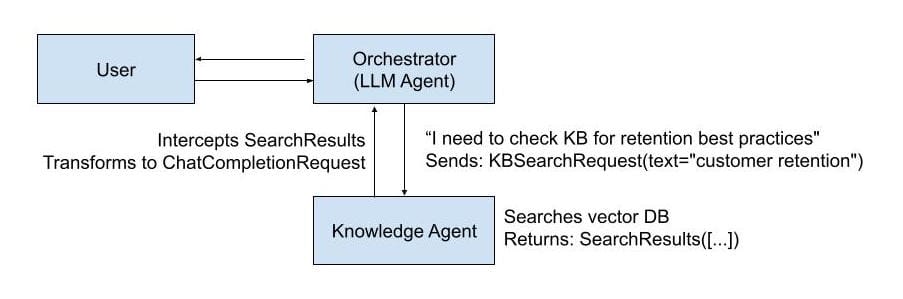
User: "Create a report to improve customer retention"
The Technical Magic:
The orchestrator doesn't execute tools—it just declares them via ToolSpec. When the LLM "calls" a tool, it generates a message (like KBSearchRequest). The guild's routing system intercepts this message, transforms it, and forwards it to the appropriate agent. That agent processes and responds. The routing system catches the response, transforms it back into LLM format, and routes it to the orchestrator as a new input.
The loop happens between agents, not inside one agent.
The Face-Off: Internal vs. Routing
Architectural Differences
| Dimension | Internal Loop (ReActAgent) | Routing Loop |
|---|---|---|
| Loop Location | Inside agent processor | Across guild routing system |
| Tool Execution | Direct subprocess calls | Messages to other agents |
| State | Conversation buffer in memory | Guild message history + state |
| Observability | Single message trace | Every step is a message |
| Composition | Single agent + toolset | Multiple agents + routing rules |
| Iteration Control | max_iterations config |
Routing rules + agent logic |
| Parallelization | Sequential tool calls | Can parallelize via routing |
| Debugging | Check LLM conversation context | Inspect message flow + routing |
| Resumability | Restart from scratch | Can resume from any message |
Performance Characteristics
Internal Loop (ReActAgent):
Latency per iteration:
  LLM call:           1-3s
  Tool execution:     50-500ms
  Context building:   <10ms
  ─────────────────────────────
  Total per loop:     1-4s

For 5 iterations: ~5-20s total
- Tight loop: Minimal overhead between iterations
- Single LLM context: No message serialization between tools
- Fast for simple tools: Subprocess overhead dominates only for very quick tools
Routing Loop:
Latency per iteration:
  LLM call:           1-3s
  Message routing:    10-50ms
  Transformation:     5-20ms
  Agent processing:   100ms-10s (depends on agent)
  Message routing:    10-50ms
  Transformation:     5-20ms
  ─────────────────────────────
  Total per loop:     1-15s

For 5 iterations: ~5-75s total
- Message overhead: Each hop adds serialization + routing time
- Variable agent latency: "Tool" agents can be slow (LLM-based, API calls, etc.)
- Parallelization wins: Can route to multiple agents simultaneously
- Guild-to-guild: Can span across guilds for massive scale
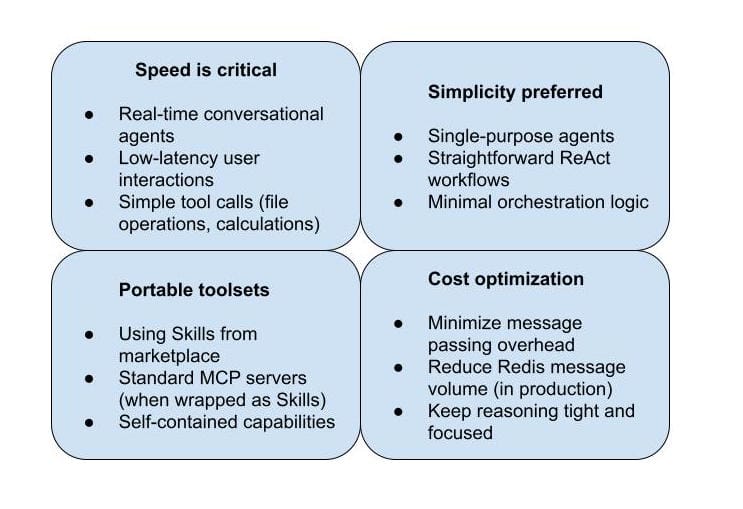
When Internal Loop Wins:
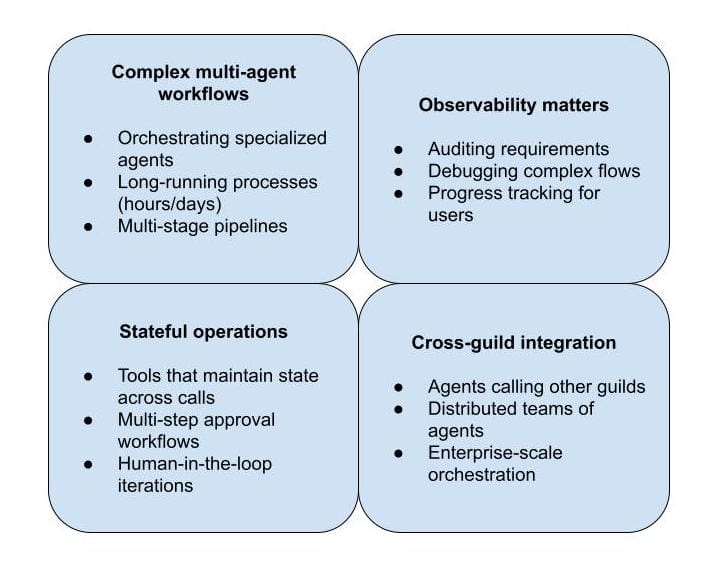
When Routing Loop Wins:
Common Pitfalls (And How to Avoid Them)
Pitfall 1: "I'll just increase max_iterations"
Symptom: ReActAgent keeps hitting max_iterations limit
Wrong Fix:
config = ReActAgentConfig(
    model="gpt-4",
    max_iterations=100,  # 🚨 This is a code smell
    toolset=complex_toolset
)
Right Fix: Break down the problem
# Option A: Routing loop with specialized sub-agents
main_orchestrator = LLMAgent(...)
data_collector = ReActAgent(max_iterations=10, toolset=data_tools)
analyzer = ReActAgent(max_iterations=10, toolset=analysis_tools)

# Option B: Better system prompt
config = ReActAgentConfig(
    model="gpt-4",
    max_iterations=15,  # Reasonable limit
    toolset=complex_toolset,
    system_prompt="""
    You are efficient. Follow this workflow:
    1. Gather ALL required data in first 3 iterations
    2. Perform analysis in next 5 iterations
    3. Finalize in last 2 iterations

    If you can batch tool calls, do it.
    """
)
Pitfall 2: "Routing for everything!"
Symptom: Simple tasks have 10-step routing flows
Wrong Pattern:
# Overkill for simple PDF extraction
user → orchestrator → pdf_router → pdf_extractor
    → result_formatter → moderator → user

# 5 agents for a one-tool job!
Right Pattern:
# Just use ReActAgent
agent = ReActAgent(
    toolset=SkillToolset.from_path(Path("/skills/pdf")),
    max_iterations=3
)

# User → Agent → User (done!)
Rule of Thumb: If your workflow is linear with <3 agents, use Internal Loop.
Pitfall 3: "I need observability, so I'll use routing"
Reality Check: Internal Loop has observability too!
# ReActAgent exposes full trace
config = ReActAgentConfig(
    model="gpt-4",
    toolset=toolset,
)

# Response includes reasoning trace
response = ChatCompletionResponse.model_validate(result)
trace = response.provider_specific_fields["react_trace"]

for step in trace:
    print(f"Iteration {step.iteration}: {step.thought}")
    print(f"  Action: {step.action}")
    print(f"  Result: {step.observation}")
When you actually need routing-level observability:
- Cross-agent coordination
- Progress tracking for long-running workflows
- Debugging complex state transitions
- Compliance/audit requirements